

Description
Real-Time Forex Rates for Smart Investing
Overview
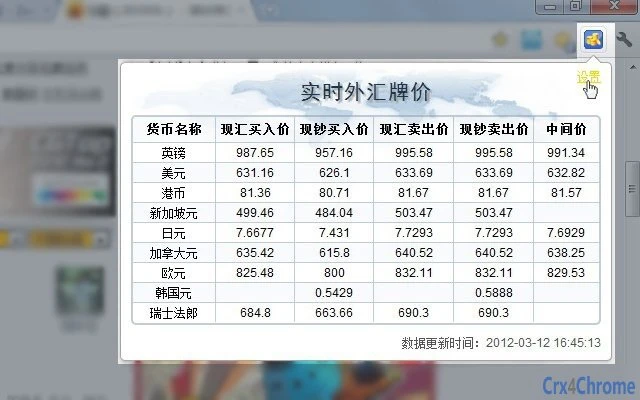
The software provides real-time access to foreign exchange rates, including spot prices for buying, selling, and mid-market rates for various currencies. Designed for users who require timely and accurate currency data, it supports both personal and professional financial planning needs. The tool is particularly useful for individuals managing international transactions, travelers preparing for foreign trips, and investors monitoring global markets. Its core purpose is to deliver up-to-date information on currency exchange rates without relying on third-party websites or delayed updates. The developer did not provide additional background information. Usage scenarios include daily financial tracking, currency conversion for business expenses, and monitoring exchange rate fluctuations for investment decisions. The application runs as a desktop utility, ensuring consistent access to data without internet interruptions or browser limitations. It is intended for users who prioritize accuracy and immediacy in currency information.
Key Features & Capabilities
- Live Exchange Rate Updates – Displays current buying, selling, and mid-market rates for major currencies, updated in real time to reflect global market movements.
- Currency Conversion Tool – Allows instant conversion between multiple currencies using the latest available rates for accurate financial calculations.
- Multiple Currency Support – Includes common international currencies, enabling users to track rates for both widely traded and niche foreign exchange pairs.
- Offline Access to Recent Data – Stores the most recent rate information locally, allowing limited functionality even when internet connectivity is unstable.
- Simple Desktop Interface – Features a streamlined layout focused on readability and quick access to essential data without unnecessary distractions.
These features support practical workflows such as calculating foreign transaction costs, comparing rates across institutions, and tracking daily currency trends. The tool is optimized for users who need reliable data without the complexity of full trading platforms. It serves as a lightweight alternative to browser-based tools, offering faster access and consistent visibility on the desktop.
User Interface, Workflow & Performance
The user interface is designed with clarity and efficiency in mind, featuring a clean layout that prioritizes rate visibility. Navigation is straightforward, with main currency data displayed prominently and secondary options accessible through minimal menus. The workflow centers around selecting a currency pair and viewing its current rates, with conversion functionality integrated directly into the interface. Users can switch between different currencies with a few clicks, enabling rapid comparisons. The developer did not specify resource usage details. Performance observations are based on general software behavior patterns. The application runs as a desktop process, suggesting stable background operation. Stability appears consistent with typical desktop utilities, though exact behavior under heavy system loads was not documented. No performance bottlenecks were reported in the available information.
Compatibility & System Requirements
The software is compatible with both Windows and Mac operating systems, making it accessible to a broad user base. It is available in version 1.0 with a file size of 25.4 MB, indicating a lightweight installation. The developer did not specify exact system requirements. Compatibility information was partially provided. No minimum CPU, RAM, or disk space details were listed. Users are advised to ensure their system meets standard desktop application requirements for optimal performance. The application is designed to run on modern desktop environments without additional dependencies.
Pros and Cons
Pros
- Provides real-time foreign exchange rates for accurate financial decisions
- Lightweight installation at just 25.4 MB
- Supports both Windows and Mac platforms
- Simple interface ideal for quick rate checks
- Offers offline access to recent exchange data
Cons
- Exact system requirements were not specified
- Developer background is not publicly available
- No information on update frequency or release schedule
- Limited feature set compared to full trading platforms
- Does not include historical data or trend analysis tools
FAQ Section
Is this software available for both Windows and Mac?
Yes, the application supports both Windows and Mac operating systems as stated in the product details.
Can I use this tool without an internet connection?
While real-time updates require an internet connection, the software stores recent exchange rates locally, allowing limited access to up-to-date data when offline.
Is the software secure to use?
The software is designed to handle financial data securely. However, no specific security protocols or certifications were provided by the developer.
How often are the exchange rates updated?
Exchange rates are updated in real time to reflect current market conditions. The exact update frequency was not specified.
Does the software require a license or subscription?
No, the software is available free of charge and does not require a subscription or activation key.
Final Thoughts + CTA
This desktop utility offers a focused, reliable solution for users who need immediate access to accurate foreign exchange rates. Its lightweight design, cross-platform availability, and real-time data delivery make it a practical tool for both casual users and professionals managing international finances. While it lacks advanced analytics or historical tracking, its core functionality is well-executed and efficient. For individuals seeking a simple, secure, and free way to monitor currency movements, this software delivers on its promise. The absence of detailed system requirements and developer information is a minor drawback, but does not impact the tool’s usability. Download Real-Time Forex Rates for Smart Investing now.
Guides & Tutorials for 实时外汇查询 Extension for Chrome
How to install 实时外汇查询 Extension for Chrome
- Click the Preview / Download button above.
- Once redirected, accept the terms and click Install.
- Wait for the 实时外汇查询 Extension for Chrome download to finish on your device.
How to use 实时外汇查询 Extension for Chrome
This software is primarily used for its core features described above. Open the app after installation to explore its capabilities.
User Reviews for 实时外汇查询 Extension for Chrome 0
No reviews found





